

✓ Why You Need a Refinance Calculator
✓ How to Use the Real-Time Refinance Calculator
✓ Analyzing Refinance Calculator Results
Ever had a headache trying to figure out your U.S. mortgage with all those calculators?
Honestly, what we really want to know isn’t all those complicated financial terms, right? 🧐
It’s just these two things: ‘Can I refinance? And if I can, how much will I have to pay each month?’
For a fail-proof refinance, Loaning.ai‘s convenient mortgage calculator—we’ll walk you through it step by step, starting now! 😎
.
Refinance Calculator: Why You Need It
Generally, U.S. banks scrutinize how much of my income goes toward debt payments (DTI) more closely, so it’s no exaggeration to say that DTI essentially determines whether a loan gets approved.
However, to accurately calculate this DTI1, you need to know the ‘final monthly payment’ that will change after refinancing. But with constantly fluctuating interest rates, complex loan product terms, and even insurance premiums (MIP, PMI) and various fees, it’s practically impossible for an individual to manually plug in all these variables and calculate it themselves.
At this point, the refinance calculator from Loaning.ai—which we’re introducing today—automatically applies real-time interest rates to calculate your ‘estimated payment amount’ in just 10 seconds, without any complicated steps. 😉✨
.
Refinance Calculator: How do I use it?
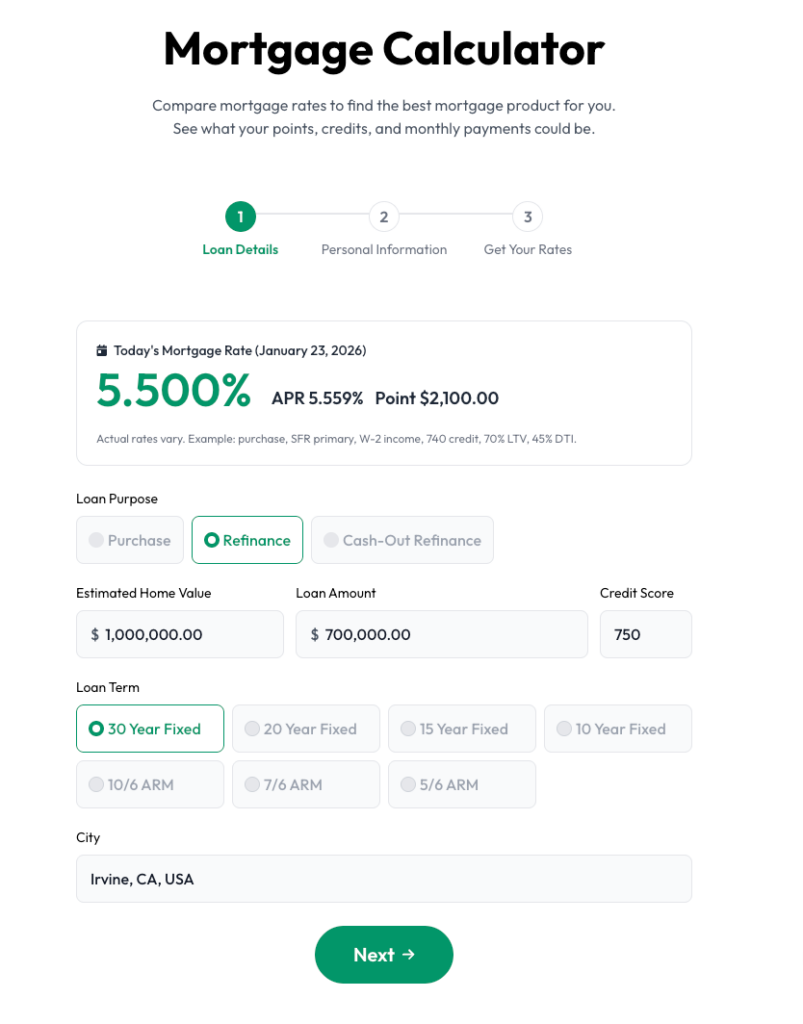
We won’t ask for your name or phone number. Just select the essential information: ‘Where is the house?’ and ‘How much do you need?’
Leave the complex calculations to Loaning.ai 💪
1. Select Purpose: Choose ‘Purchase’ for buying a home or ‘Refinance’ for refinancing.
2. Enter Amounts: Input the estimated Home Value and the required Loan Amount.
3. Set Terms: Select the loan term (e.g., 30 Year Fixed) and your approximate Credit Score.
4. Enter Location: Type in the city name (e.g., Irvine) and click ‘Next’!
1. Select Status: Click the option that applies to you (Citizen, Permanent Resident, or Visa Holder).
2. Income Type: Select ‘Salary W2’ for employees, or ‘1099/Business’ for freelancers or business owners.
3. Select Usage: Choose ‘Primary’ for your main residence or ‘Investment’ for investment properties.
4. Property Type: Select the housing type (Single Family, Townhouse, Condo) and click ‘Get Your Rates’!
.
How to Use the Refinance Calculator Results
Using the table at the top of the results screen, you can instantly compare various scenarios: whether to pay a little more in points to lower the interest rate or get credit to save on upfront costs. Don’t just look at the interest rate number.
Choose the ‘golden ratio’ that best suits your financial situation and planned tenure to maximize your benefit.
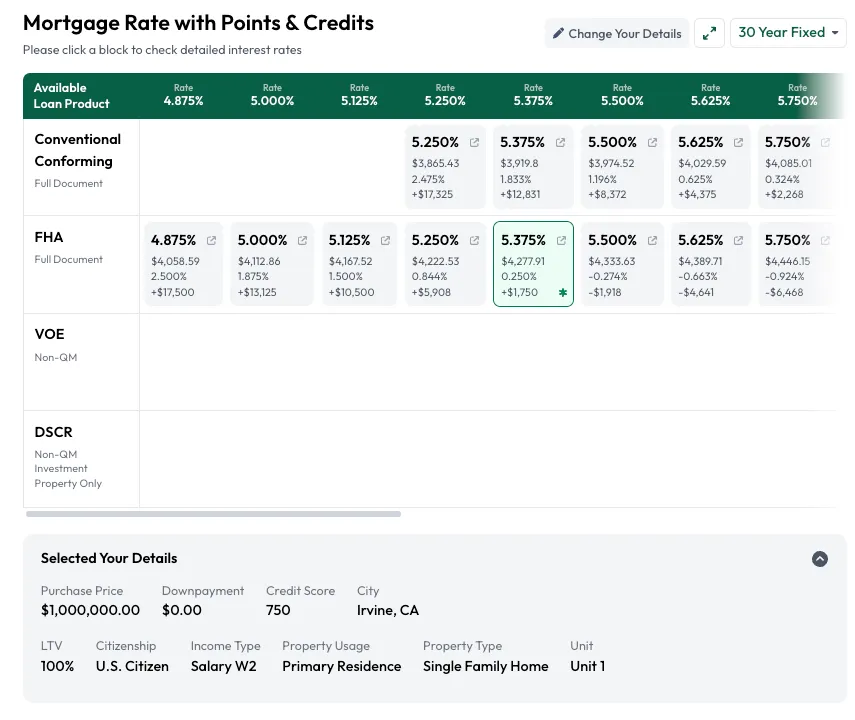
(Full Document)
(Full Document)
.
Loaning.ai Refinance Calculator, Here’s What Sets It Apart ✨
Unlike a standard calculator that merely multiplies simple interest rates, we save you time by using the exact same logic as the actual loan approval process.
We accurately calculate the APR you can realistically expect based on your credit score and financial situation.
Loaning.ai doesn’t want you to get tired of unwanted calls. Use our ‘opt-out’ setting to prevent indiscriminate spam calls and personal information leaks.
Use the ‘Opt-out’ setting to block indiscriminate spam calls and prevent personal information leaks.🔒
This feature prevents financial companies from sending marketing offers based on your information.
Loaning.ai values your information above all else. 🙂

.
Rather than house hunting based on vague feelings, it’s crucial to first determine your precise budget.
Use Loaning.ai’s Refinance Calculator right now to find out the home price you can afford and the exact monthly payment you’ll need to make!
.
.
.
.
.
.
.
.