

My HomeCheck is a free property report service from Loaning.ai.
Simply enter the address of a home—no personal information required—to review loan options, estimated monthly housing costs, required income, flood risk, HOA details, and transaction history in about 10 seconds.
Here’s how to search for a property and review your My HomeCheck report step by step. 😎
.
Step 1. Enter the Property Address
Visit My HomeCheck and enter the address of the home you want to review.
Select the complete address—including the street, city, state, and ZIP Code—from the autocomplete list. Then click Analyze.
If no results appear, check that:

.
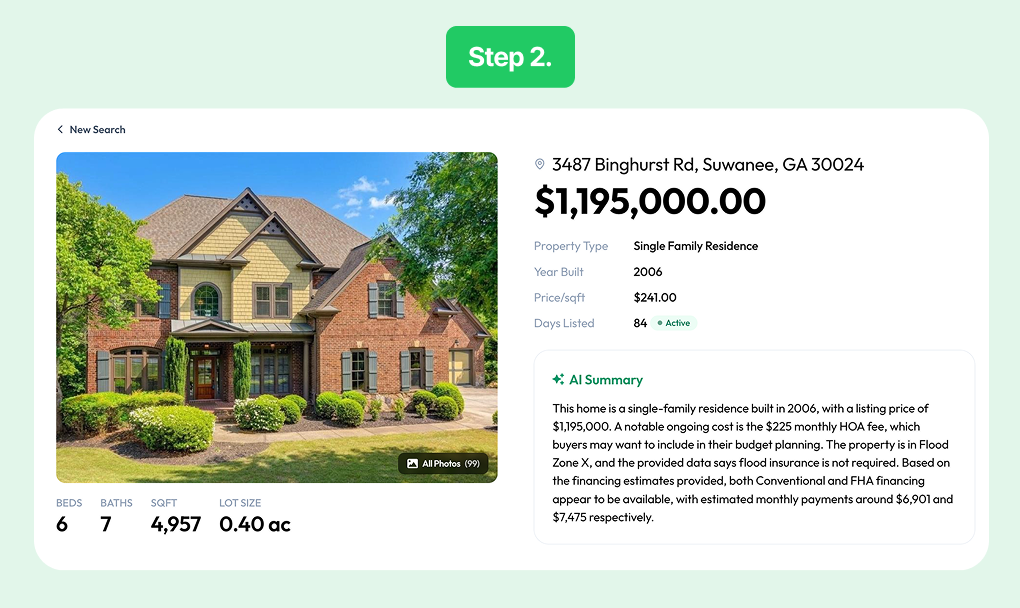
Step 2. Verify the Basic Property Information
Let’s use 88 Maple Ave, Irvine, CA 92620 as an example.
Once the report is generated, first confirm the property details:
Incorrect property information may affect the loan and cost estimates. If anything differs from the listing, compare it with the listing page and public records to identify the latest information.
.
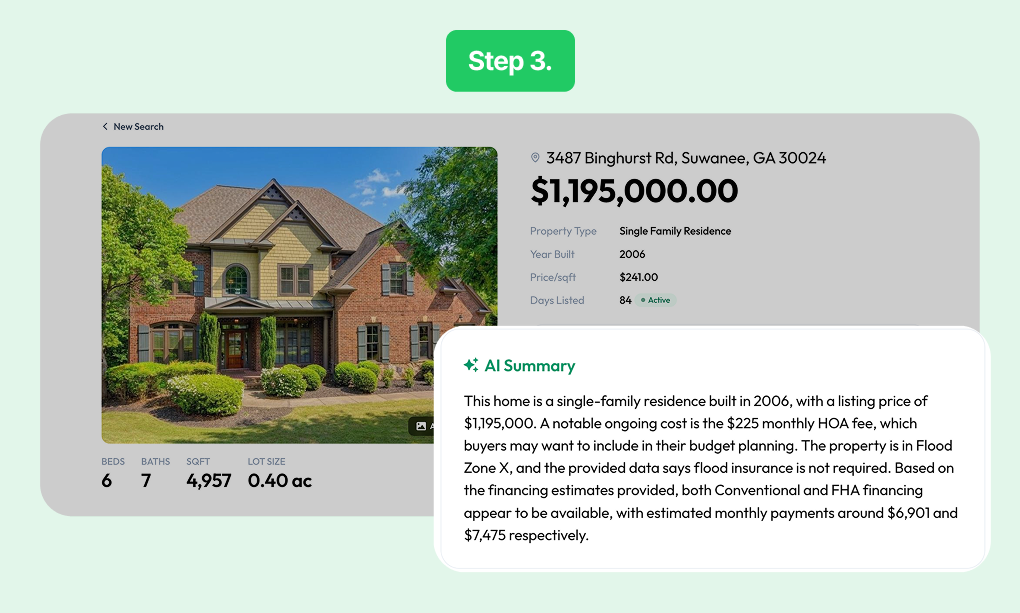
Step 3. Start with the AI Summary
The AI Summary highlights key information about financing, costs, and potential risks.
Read it first to quickly identify which parts of the report require closer attention.
However, because it is only a summary, review the detailed sections before making a decision.
.
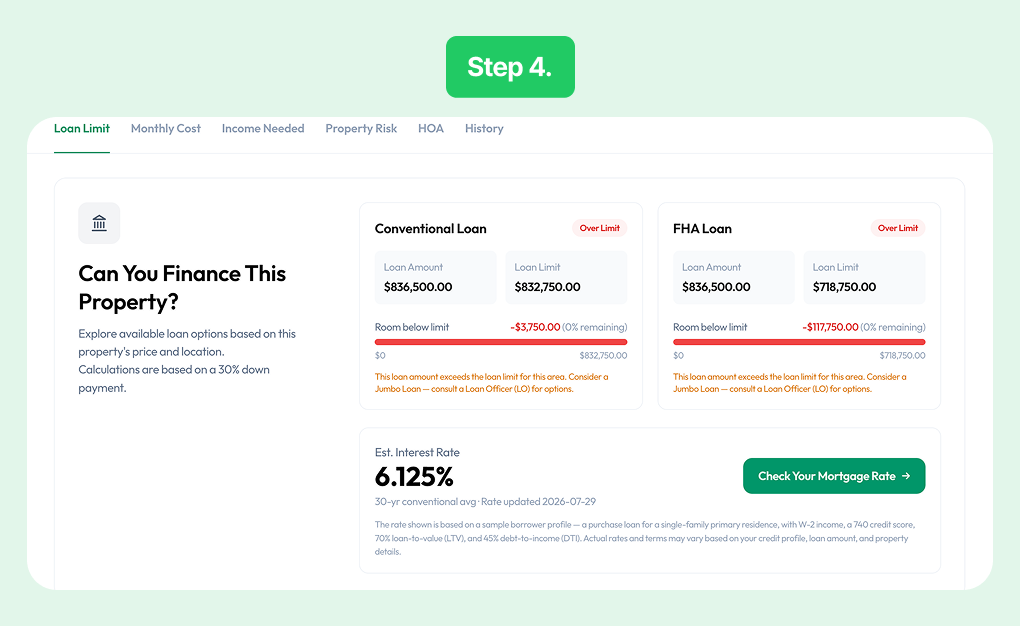
Step 4. Compare Loan Options
In Can I Finance It?, you can compare Conventional and FHA loan information based on the property’s price and location.
Review:
An Eligible result does not mean the loan is approved. Final approval and terms depend on your income, credit score, debt, down payment, and the lender’s underwriting requirements.
.
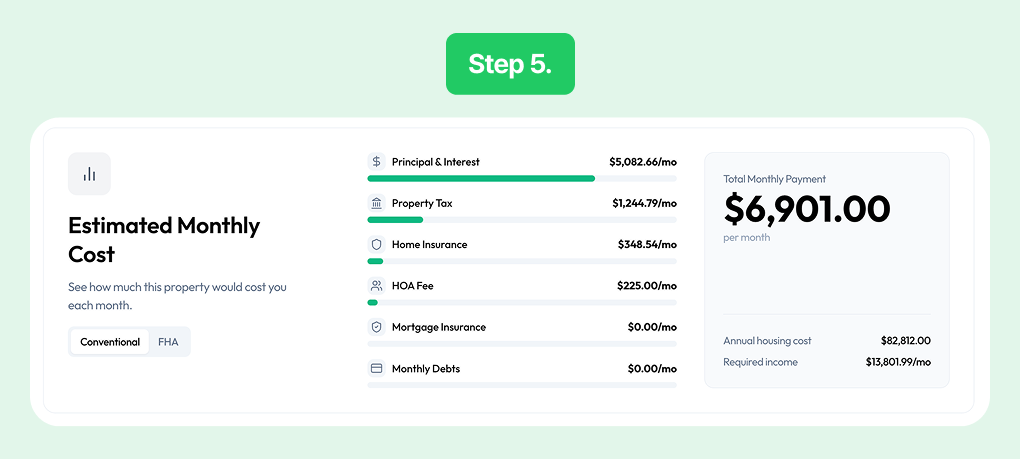
Step 5. Review the Estimated Monthly Housing Cost
Estimated Monthly Cost shows the projected monthly cost of owning the home.
It generally includes:
Check Total Monthly Payment for the full estimate. Compare your budget with the total—not just the listing price or principal and interest.
These figures are estimates based on current inputs and assumptions. Actual costs may vary depending on your loan terms, tax rate, and insurance quote.
.
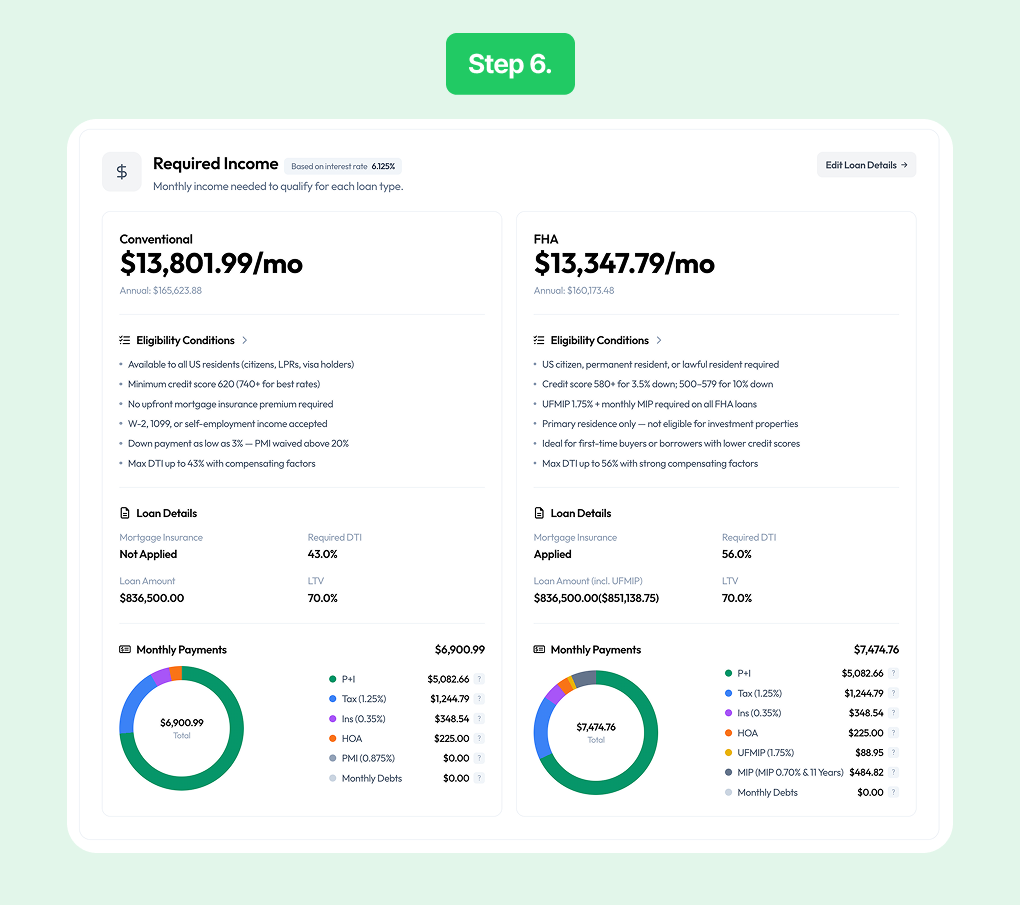
Step 6. Compare the Estimated Required Income
Required Income compares the estimated income needed for Conventional and FHA loans.
Each option may include:
Comparing the two options can help you identify which may be closer to your current budget.
Required income is only an estimate. Actual underwriting also considers your credit score, debt-to-income ratio, employment, assets, and other debts.
.
Step 7. Check Flood Risk
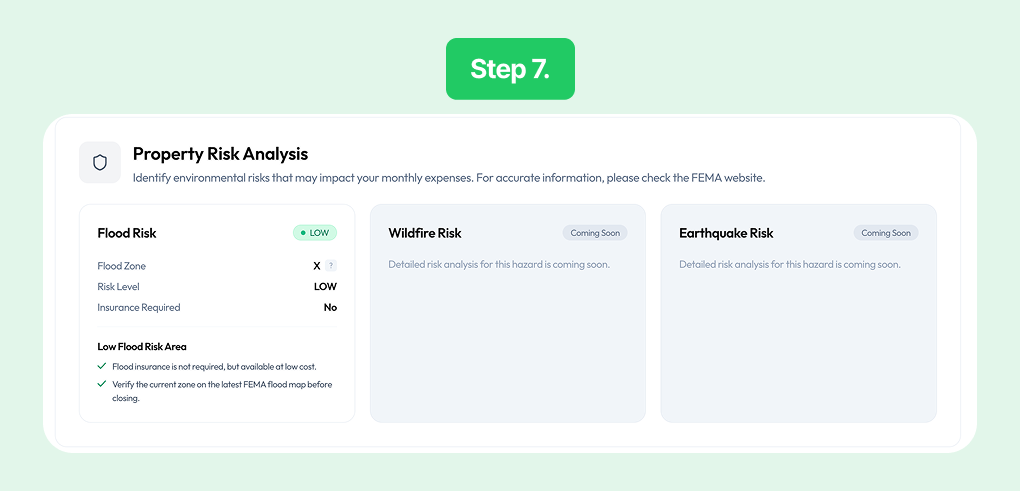
Property Risk Analysis provides available natural-hazard information for the property.
If flood-risk data is available, review:
If the report shows elevated risk or a possible insurance requirement, ask an insurer about coverage availability and premiums. You should also review the latest FEMA flood maps and local records.
If Wildfire Risk or Earthquake Risk shows Coming Soon, the analysis is not yet available. It does not mean the property has low risk.
.
Step 8. Review HOA Costs and Obligations
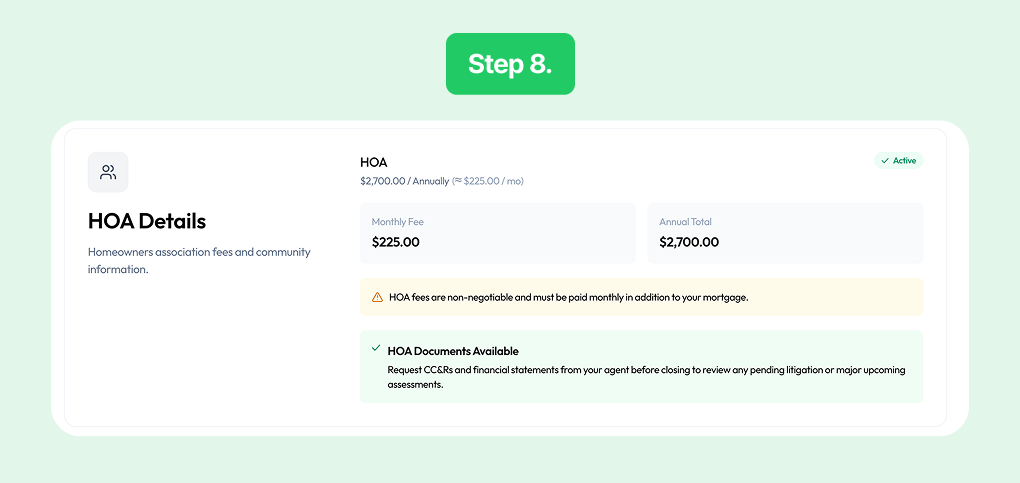
HOA Details shows available HOA information connected to the property.
Review:
A property may be connected to more than one HOA, so review every association listed.
You should also check the actual HOA documents for CC&Rs, recent budgets, reserve funds, planned dues increases, and possible special assessments.
.
Step 9. Review Transaction and Price History
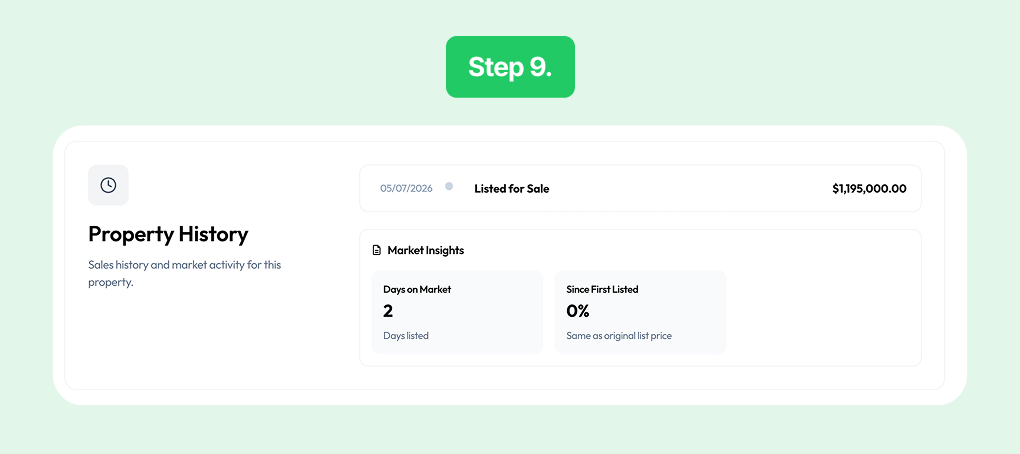
Property History shows past transactions and changes in the property’s listing price.
Review:
A recent price reduction or a long time on the market may be useful when considering whether to negotiate.
However, past sale prices alone cannot determine the home’s current value. Compare recent nearby sales and consider the property’s condition as well.
.
Step 10. Save the Report as a PDF
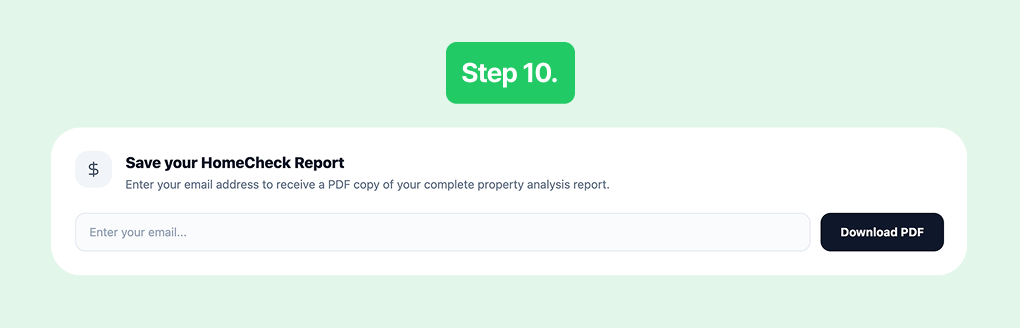
Go to Save Your Home Check Report at the bottom of the report.
Enter your email address and click Download PDF to save the report or receive it by email.
A saved PDF can help you:
.
What to Do After Reviewing the Report
Use your My HomeCheck report to organize any questions that still need confirmation:
My HomeCheck’s estimates and analyses are based on public records, third-party data, and calculation assumptions. They do not replace loan approval, an insurance quote, an appraisal, or a professional home inspection.
.
Check a Property Now
Prepare the address of a home you are interested in and enter it into My HomeCheck. Follow the steps above to review its estimated costs and key property information in order.